Hassle free, 2-Year Warranty
Fast, Free Shipping on Orders $35+
Lifetime Technical Support
30-Day Money Back Guarantee
Plugable USB-C Cables, Data Blocker Charge Only, 240W (6 inch, Pack of 5)
$24.95 USD
SKU: USBC-CCS5XAmazon Rating : (60 Reviews)
Features
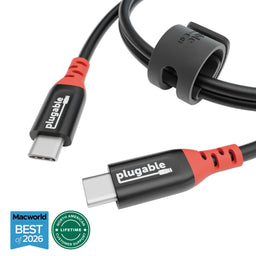
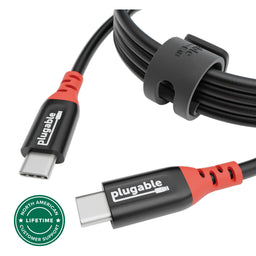
- Get Charged Up— Charge up all of your devices. This 5-pack of Plugable 6in, 240W USB-C charge cables are built for secure, clutter-free charging. Bright red connectors and “Data-Blocking Charging Cable” tags let you know what to expect at a glance
- Extended Power Range to 240W— Each 240W USB C cable supports Extended Power Range up to 240W (48V/5A), perfect for laptops, tablets, and more. A built-in E-Marker ensures safe USB PD 3.1 performance
- Safer by Design— Each heavy-duty USB C charging cable omits data lines for true security and protection against juice jacking in airports, schools, libraries, and public kiosks. No need to carry around additional data blocking adapters
- Universal USB-C Charging— Works with any Power Delivery-compliant device up to 240W, from laptops to tablets—ideal as a MacBook Pro cable for home, office, or travel charging setups
- Lifetime Support— Each USB C 240w cable has been designed with reliability at its core and was built to meet the deployment demands of IT departments and the ease of use necessary for home offices. Includes lifetime support from our North American team of connectivity experts
For volume orders or business inquiries contact sales@plugable.com
Free 3-Day Continental U.S. Shipping on Orders Over $35!
All Buying Options
A: Yes, this cable is backwards compatible with low wattage devices and will work with all USB-C Power Delivery charging levels.
A: This charging cable has the USB data lines physically blocked, which helps prevent data transfer and potential data theft or malware attacks.
A: You can use this cable with any USB-C charger, but to achieve the full 240W charging speed, you must pair it with a USB PD 3.1 compliant EPR-capable charger. Using it with lower-spec chargers will still work but at reduced charging speeds.
A: No. This is a true charge-only cable. It physically omits all USB data lines, preventing any data transfer for enhanced security against juice jacking and other threats.
A: Supports any USB-C device with PD charging, including laptops like MacBook Pro/Air, Dell XPS, Lenovo ThinkPad, plus tablets, smartphones, gaming devices, and USB-C accessories.
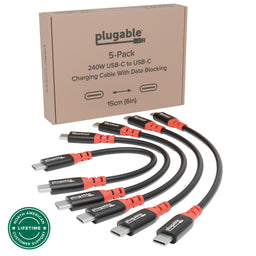
In The Box
| Item and Quantity | Item Notes |
|---|---|
| 5x USB-C Data Blocking 6-inch 240W Charging Cable |
Included Cables
| Port Type (Side 1) | Cable Specification | Port Type (Side 2) | Cable Length | External Power for Cable |
|---|---|---|---|---|
| Male USB-C | N/A | USB-C | 0.15m/0.49ft | No |
Connection To Host
| Port | Placement | Version and Link Rate | Features |
|---|---|---|---|
| 1x USB-C | Cable End | N/A |
Physical Stats
| Item | Size (H x W x D) or Length | Weight | SKU or Part Number |
|---|---|---|---|
| USB-C Data Blocking 6-inch 240W Charging Cable | 0.15 meters 0.5 feet |
9.98 grams 0.4 ounces |
USBC-CCS5X |
Compatible Devices
Please note that this charge cable should work with any USB-C device that supports Power Delivery.
- Laptops and Ultrabooks: Compatible with USB-C charging laptops, including MacBook Pro/Air, Dell XPS, HP Spectre, Lenovo Yoga, and ThinkPad series.
- Tablets: Supports charging for USB-C tablets, including the iPad Pro, iPad Air (4th generation and later), Microsoft Surface Pro 7/8, and Samsung Galaxy Tab S series.
- Smartphones: Ideal for USB-C smartphones, including Apple iPhone 16/Pro, Samsung Galaxy S and Note series, Google Pixel, and other Android devices.
- Gaming Devices: Suitable for charging USB-C gaming devices, such as the Nintendo Switch and Steam Deck.
- Accessories: Works with USB-C (PD) power banks, headphones, gaming controllers (PS5, Switch Pro controller), and other peripherals requiring USB-C charging.
Get Started
- Plug one end into a USB-C power adapter (up to 240 W PD supported).
- Connect the other end to your device’s USB-C charging port.
Key Benefits:
- Safe charging only, no risk of data theft (“juice jacking”). (Charge-only cables do not support data)
- Supports the latest USB PD 3.1 EPR standard, up to 240 W.
- Works with laptops, tablets, phones, and gaming devices.
Questions? We're here to help! Please reach out to us at support@plugable.com
Filter Help Articles and Frequent Questions by Category
Choose one or more filters within each category to narrow down the articles. Each selection will result in only displaying articles that include all of your choices.
Articles
Well how about that, it looks like we don't have any articles matching your filters! Try removing one of your choices or clear the filters to show all articles.
You can always contact support if you need help too!
What is USB-C Power Delivery R3.1 Extended Power Range (EPR)?
The new USB Power Delivery specifications allow for the delivery of up to 240W via a USB Type-C cable (an increase from the previous 100W max). The previous Power Delivery range has been relabeled as Standard Power Range (SPR), and the new specifications (between 100W and 240W), have been labeled as Extended Power Range (EPR).
For a more in-depth look feel free to check out our blog post on this topic here: https://plugable.com/blogs/news/what-is-240w-usb-extended-power-range-epr
What is an E-Marker and why do they matter for power delivery?
An E-marker is a tiny embedded chip in USB cables that signals the cable's charging capabilities to connected devices. This chip is vital for USB-C cables, to negotiate the handling of high charging rates.
E-markers are for ensuring proper charging rates between the cable and the device, particularly for features like USB Power Delivery and are essential for fluctuating power demands by devices.
Will My 240W Cable Work With Lower Wattage Devices?
Yes! Our 240W cables can transfer up to 240 watts of power, which means that it can also transfer lower wattages such as 45W, 60W, 85W, 100W, 140W, and anything in between.
Understanding how adaptive/optimized charging methods have an impact on your smartphone's battery life, performance, and longevity.
With most modern smartphones you may have likely noticed a notification message while charging your phone indicating that your phone has entered "Optimized Battery Charging", this is how Apple refers to its smart charging messaging. With Android devices they will also show this notification message while charging although they refer to it "Adaptive Charging". Through these intelligent charging methods your phone will artificially reduce its charging speeds so that in the long run it will lengthen its overall battery life.
When setting up a new smart phone it may take a few weeks of machine learning to recognize your usage behavior and charging habits. Batteries go through wear and tear to which the more charge cycles it goes through the less healthier the overall battery becomes leading to it holding a lesser charge and other issues.
Your phone will alert you with a notification when it enters into a battery preserving charging state. At night you may notice your phone charging significantly slower along with a message saying “Battery full by 7:00 AM”. Even though it has the ability to fully charge in a much shorter time. If you set an alarm for an even earlier time your phone can adjust to finish charging at your alarm time. This is your phone prolonging the time it takes to charge to 100% in order to preserve battery health.
The reason why your phone will artificially slow its charging rate is to spend less time at 100% battery, and the less time your phone spends at 100% the more it helps with your overall battery health.
It is possible to disable Optimized/Adaptive Charging in your device's battery and charging settings although it is ideal for the majority of users to leave this setting enabled.
Can I connect this product to a computer's Thunderbolt/Thunderbolt 2 port?
Many users assume that USB-C devices can work with older Thunderbolt 2 Macs if they use a Thunderbolt 3 to Thunderbolt 2 adapter, such as the one made by Apple. However, this is not the case. These adapters are specifically designed to support Thunderbolt devices only - not standard USB-C peripherals.
While Thunderbolt 3 and USB-C share the same connector type, they use different underlying data protocols. Non-Thunderbolt USB-C devices, rely on USB standards for data and power. The Thunderbolt 3 to Thunderbolt 2 adapter does not carry USB signals; it only passes Thunderbolt data. Because of this, plugging a USB-C device into a Thunderbolt 2 Mac using this adapter will not work - the computer will not detect or communicate with the device.
If you need to connect peripherals to a Thunderbolt 2 system, we recommend using a USB-A dock or hub (if available on your system). This ensures compatibility without relying on unsupported adapter chains.
In short, even though the connectors may fit, USB-C devices are not compatible with Thunderbolt 2 Macs via Thunderbolt adapters - only Thunderbolt devices will work in that setup.
What is the maximum length cable that can be used to connect a Plugable USB-C docking station to the host computer?
All Plugable USB-C docking stations include the appropriate USB-C cable in order to connect the docking station to the host computer. As of this writing, all Plugable USB-C host cables that are included with Plugable USB-C docking stations are 1.0 meter (approximately 3.3) feet in overall length.
For reference, the specifications of all Plugable brand USB-C cables are printed on a small white cable flag attached to the cable itself.
If the original 1.0 meter long USB-C host cable is not sufficient for a specific use case, longer cables of up to 2.0 meters (approximately 6.6 feet) in overall length can be purchased separately from a 3rd-party.
We recommend purchasing a cable that matches or exceeds the specifications of the original Plugable cable and purchasing said cable from both a well known and reliable brand.
Plugable does offer a 1.0 meter long USB-C extension cable (USBC-METER3-1MF) that can be used in conjunction with our USB-C docking stations. This extension cable can be combined with the original 1.0 meter long Plugable USB-C cable included in the box with the docking station to extend the overall cable length to 2.0 meters.
Plugable does NOT support using USB-C host connection cables that are over 2.0 meters in overall length with any Plugable brand product. Additionally, Plugable does NOT support the use of any type of 3rd-party USB-C extension cable or signal repeater in conjunction with our products.