Hassle free, 90-Day Warranty
Fast, Free Shipping on Orders $35+
Lifetime Technical Support
30-Day Money Back Guarantee
Give Tech a Second Life
This refurbished Plugable product is fully tested, supported, and ready for use. Buying refurbished helps reduce e-waste while offering a lower-cost option for dependable tech.
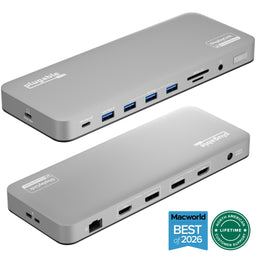
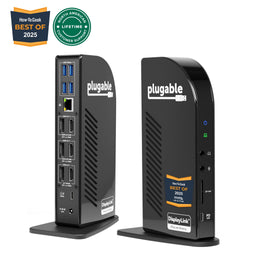
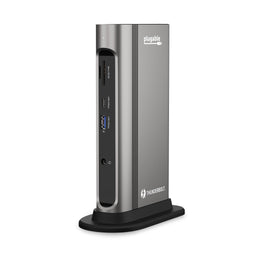
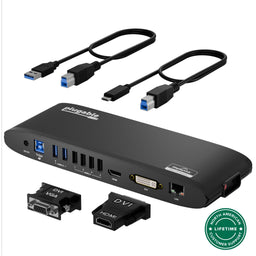
Plugable USB-C Docking Station for Mac, Dual 4K Monitors, 100W Laptop Charging (B-Stock)
$279.99
$169.99
USD
SKU: UD-6950PDH-BSTOCK機能
- 14-in-1 Dock for Mac— Premium aluminum housing with space gray finish; supports 2x 4K monitors in HDMI, DisplayPort or both, front-facing USB-C and USB port for charging, 3 additional USB 3.0 ports, SD and microSD card readers, 3.5mm headset jack, Ethernet, and 100W charging
- Enable Dual 4K Displays on M1-M5 Macs— Enable 2x 4K 60Hz monitors via HDMI and DisplayPort—even on Macs and Neo devices that natively support only one external display. Perfect for productivity-driven environments like business workstations, teaching stations, and healthcare documentation setups
- Work around Mac Display Limits— Some Macs only support a single extended monitor. Named the Best DisplayLink Dock for MacBook by Macworld, this USB-C dock uses DisplayLink technology to circumvent display limitations. It’s an ideal solution for multitaskers and M1/M2/M3/M4/M5/Neo MacBook, MacBook Air, and MacBook Pro users
- Ideal for Office and Hybrid Work Setups— Compatible with macOS 11+, Windows 10+, and ChromeOS 100+ on supported Thunderbolt, USB4, or USB-C systems. Requires driver installation for full functionality. HDCP not supported
- Lifetime Support— This MacBook docking station has been designed with reliability at its core and was built to meet the deployment demands of IT departments and the ease of use necessary for home offices. Includes lifetime support from our North American team of connectivity experts
- 90-Day Warranty— All Plugable B-Stock products are covered by a 90-day limited warranty against any defects in materials or workmanship.
For volume orders or business inquiries contact sales@plugable.com
Free 3-Day Continental U.S. Shipping When Buying Direct!
The Dual Display Dock for Mac
A: Yes, this dock allows for two additional 4K@60Hz displays to be connected via HDMI, DisplayPort, or a combination of both.
A: Yes, DisplayLink software is required for the UD-6950PDH to display an image. Manual installation is required for macOS, Windows installation is typically automatic. We recommend installing the latest DisplayLink software for the best performance.
A: No, HDCP (High-bandwidth Digital Content Protection) is not supported on macOS when this docking station is connected. HDCP content will not play on any displays, including the built-in display or those connected directly to the computer
A: The front USB-C port is for accessories and peripheral charging only (wireless earbuds, keyboards, phones). The USB-C port on the side of the dock is the host connection
A: macOS 上で DisplayLink Manager アプリケーションが正しく動作するためには、「画面録画」機能をオンにする必要があります。これを承認すると、アプリケーションは DisplayLink 機器経由で接続されたモニタへ USB バスを介してデータを送信できるようになるためです。この際に、データ、画像、グラフィック・ピクセルが保存または記録されることはありません。
パッケージ内容
| パッケージ内容と数量 | 注記 |
|---|---|
| 1x USB-C デュアル 4K ドッキングステーション | |
| 1x クイックスタートガイド | |
| 1x USB-C ケーブル | |
| 1x 電源アダプタ |
同梱ケーブル
| ポートタイプ(側面 1 ) | ケーブル仕様 | ポートタイプ(側面 2 ) | ケーブル長 | ケーブル用外部電源 |
|---|---|---|---|---|
| USB-C(オス) | USB 3.2 Gen 2(10Gbps) | USB-C | 1.0 m | いいえ |
LED
| LED 番号 | 形状 | 色 | ステータス | 定義 | 備考 |
|---|---|---|---|---|---|
| 1 | 丸 | White | 点灯 | 電源オン |
グラフィック
| ポート | 場所 | 仕様 | 最大解像度とリフレッシュレート | HDCP | チップセット |
|---|---|---|---|---|---|
| 2x HDMI 4K または
DisplayPort++ (出力) |
背面 | DisplayPort 1.2 または HDMI 2.0 | 3840x2160 @ 60Hz 3840x2160 @ 60Hz3840x1600 @ 60Hz 3440x1440 @ 60Hz 2560x1440 @ 60Hz 2560x1080 @ 60Hz 1920x1080 @ 60Hz 1600x900 @ 60Hz 1280x1024 @ 60Hz 1280x800 @ 60Hz 1280x720 @ 60Hz 1152x864 @ 60Hz 1024x768 @ 60Hz 800x600 @ 60Hz 640x480 @ 60Hz |
非対応 | DL-6950 DisplayLink |
オーディオ
| ポート | 場所 | 接続方法 | 最大ビット深度とサンプルレート | 信号出力 | チャネル | チップセット |
|---|---|---|---|---|---|---|
| HDMI (出力) |
背面 | DisplayLink HDMI | デジタル | 2 | DL-6950 DisplayLink |
|
| HDMI (出力) |
背面 | DisplayLink HDMI | デジタル | 2 | DL-6950 DisplayLink |
|
| DisplayPort (出力) |
背面 | DisplayLink DisplayPort | デジタル | 2 | DL-6950 DisplayLink |
|
| DisplayPort (出力) |
背面 | DisplayLink DisplayPort | デジタル | 2 | DL-6950 DisplayLink |
|
| 音声入出力ジャック (双方向) |
前面 | 3.5mm (TRRS) | アナログ | 2 | DL-6950 DisplayLink |
電源
| ポート | 場所 | 電源 ホスト/デバイス | 接続タイプ | AC Inlet | 備考 | 電圧 | アンペア | ワット数 |
|---|---|---|---|---|---|---|---|---|
| 電源 | 背面 | 周辺機器 | 電源アダプタ | IEC C13/C14 | 20.0V | 6.5A | 130.0W | |
| USB Type-C | 背面 | ホスト PC | USB-C PD 充電 | 20.0V | 5.0A | 100.0W |
デバイス接続用 USB ポート
| ポート | 場所 | バージョンとリンクレート | 機能 | 電圧 | アンペア | ワット数 |
|---|---|---|---|---|---|---|
| 3x USB-A | 前面 | USB 3.0(5 Gbps) | 5V | 900mA | 4.5W | |
| 1x USB-A | 前面 | USB 3.0(5 Gbps) | バッテリー充電規格 BC 1.2 | 5V | 1500mA | 7.5W |
| 1x USB-C | 前面 | USB 3.0(5 Gbps) | 5V | 1500mA | 7.5W |
ホストへの接続
| ポート | 場所 | バージョンとリンクレート | 機能 |
|---|---|---|---|
| 1x USB-C | 背面 | USB 3.0(5 Gbps) | USB PD 充電 |
有線 LAN ネットワーク
| ポート | 場所 | バージョンとリンクレート | 機能 | チップセット |
|---|---|---|---|---|
| DisplayLink ギガビット・イーサネット | 背面 | 1000BASE-T | DL-6950 DisplayLink |
物理仕様
| 項目 | サイズ(高さ×幅×奥行き)または長さ | 重量 | 製品番号 |
|---|---|---|---|
| UD-6950PDH Docking Station | 2.45 x 22.5 x 8.5 centimeters 1 x 8.9 x 3.3 inches |
465 grams 16.4 ounces |
UD-6950PDH(日本未発売) |
カードリーダー
| メディア・インターフェース | バス・インターフェース | バス・スピード | チップセット |
|---|---|---|---|
| Micro SD | Ultra-High Speed I(UHS-I) | 104 MB/s | Genesys Logic GL3231S |
| SD、SDHC、SDXC、または MMC | Ultra-High Speed II (UHS-II) | 312 MB/s | Genesys Logic GL3231S |
| 互換性 | Supports hosts with USB-C, USB4, and Thunderbolt 3 / Thunderbolt 4 / Thunderbolt 5 systems running Windows 10 / 11 & ChromeOS 100 or newer & macOS 11 and later. This includes the hosts listed below, along with thousands of other laptops which are compliant with full-featured, standards-compliant USB-C ports. |
| macOS システム | M1/M2/M3/M4/M5-based MacBooks (Base models and Pro / Max models), MacBook Neo, Intel-based Thunderbolt 3 MacBooks (late 2016+) |
| Windows システム | HP ProBook / EliteBook / Spectre x360シリーズ、Dell XPS / Latitude / Inspiron シリーズ、Lenovo ThinkPad / IdeaPad / Yoga、Microsoft Surface Pro / Go / Book / Laptop モデル、LG Gram など |
| ChromeOS システム | Google Pixelbook、Samsung Galaxy Chromebook、 Lenovo Flex Chromebooks、 HP Chromebook、Dell Chromebook など |
推奨される使用環境
DisplayLink ベースのドッキングステーションやグラフィック変換アダプターを使用すると、コンピュータ内蔵の GPU による外部モニタ接続台数の制限を超えてより多くのモニタを接続できるようになります。DisplayLink ソフトウェア(デバイス・ドライバ)は、グラフィック・ハードウェアをエミュレートすることでこれを実現しています。このような技術は、オフィスや軽いウェブ表示等のアプリケーションには最適ですが、2D または 3D グラフィックスアプリケーション、フルスクリーンのビデオ再生、ビデオ編集ソフトウェア、およびゲームでは期待通りに動作しない可能性があります。後者のようなアプリケーションは、このドッキングステーションでの使用は推奨されません。
性能やソフトウェアの互換性の問題を防ぐため、ホストコンピューターの OS、システムファームウェア、デバイス・ドライバーを最新状態にすることをお勧めします。これにより、予期せぬ切断やパフォーマンス低下の可能性を低減することができます。システム・ファームウェアのアップデートは、PC メーカーの Web サイト、またはデバイス製造メーカーから直接入手できます(例:グラフィックス・デバイスドライバのアップデートは、GPU の製造元から入手、など)。 Intel グラフィックス・ドライバーは、コンピューターメーカーまたは Intel 社のウェブサイトからダウンロードできます。
最低システム要件- オペレーティングシステム
- Windows 11、10
- Windows Update を最新状態にアップデートすることを推奨
- DisplayLink デバイス・ドライバのインストールには、管理者権限が必要
- macOS 11 (Big Sur), macOS 12 (Monterey), macoS 13 (Ventura), macOS 14 (Sonoma), macOS 15 (Sequoia), macOS 26 (Tahoe)
- Apple 社提供の最新 OS アップデートの導入を推奨
- DisplayLink Manager アプリケーションのインストールには管理者権限が必要
- MacOS のユーザーは、DisplayLink およびmacOS との互換性についての追加情報を参照してください。
- ChromeOS 100+
- We recommend installing all ChromeOS software updates
- DisplayPort 代替モードをサポートする USB-C ポート(Thunderbolt 3、4、USB4 対応のポートも可)
- 最大 3840x2160(4K UHD)解像度に対応したモニタ(4K 解像度に対応するには、HDMI 2.0 以上または DisplayPort 1.2 以上の入力ポートが必要)
- USB-C PD 充電規格対応ポート。このドッキングステーションを、コンピュータに同梱されてきた電源アダプターの代替で 100W 電源として使用できます。
- コンピュータゲーム: ほとんどの 2D および 3D ゲームは、DisplayLink 技術を使った機器ではサポートできない、ハードウェアグラフィックスアクセラレーションを必要とします。したがってこのドッキングステーションを経由して接続したモニター上では、ゲームが正しく起動しないことがあります。 2D または 3D グラフィックス・アプリケーション:これらのアプリケーションは、多くの場合 DisplayLink デバイス・ドライバがサポートしていないハードウェア・グラフィックス・アクセラレーションに依存していいます。このドッキング・ステーションを経由して接続したモニター上では、これらのアプリケーションのパフォーマンス、機能、互換性が低下する可能性があります。
- HDCP(コンテンツ保護機能)は、DisplayLink 機能を使ったモニター上では表示できません。
- 画面回転は、DisplayLink マネージャー 1.6 以降 かつ macOS 12.2 以降が必要です。macOS で縦置きモニターを使用したい場合には様々な制限事項がありますので、Plugable 技術サポートにお問い合わせください。 2D または 3D グラフィックス・アプリケーション:これらのアプリケーションは、多くの場合 DisplayLink デバイス・ドライバがサポートしていないハードウェア・グラフィックス・アクセラレーションに依存していいます。このドッキング・ステーションを経由して接続したモニター上では、これらのアプリケーションのパフォーマンス、機能、互換性が低下する可能性があります。
- このドッキングステーションがコンピュータに接続されている間は、Mac システム上で HDCP (コンテンツ保護)に非対応です。HDCP コンテンツは、すべてのディスプレイ(内蔵ディスプレイやコンピュータに直接接続されたディスプレイを含む)で再生できません。再生したい場合は、DisplayLink 機器を一時的に取り外してください。
- HiDPI 解像度(Retina)は、DisplayLink 技術を使った当 UD-6950PDH のグラフィックポートを介して接続されたモニタではサポートされていません。4K UHD(3840x2160)対応のモニタは、4K ネイティブ解像度またはRetina スケーリングなしの 1080P(1920x1080)解像度のいずれかに制限されますので注意してください。
- 現時点では、DisplayLink 技術を使用したドッキングステーションを Linux で使用することできません。
注意:USB-C ポートを持つすべてのコンピュータが、USB-C PD 充電規格に対応しているわけではありません。使用しているノート PC がこの UD-6950PDH ドッキングステーションと互換性があるかどうかが不明な場合は、Plugable 社技術サポート nihongo@plugable.com までお問い合わせください。
サポートされていない構成と機能
すべてのOS - Windows 11、10
macOS インストールとセットアップ
- macOS 用のデバイス・ドライバである DisplayLink Manage を こちらのタブからダウンロードし、インストールします。
- 詳しいインストール方法と設定方法は、青い「情報」ボタンをクリックするか、次のステップで確認できます。
- お使いの macOS バージョン別に、下記のリンクの説明を参照して DisplayLink ソフトウェアをインストールし、設定してください。
- 電源をコンセントまたは電源タップに接続してから、ドッキングステーションに接続します。
- 外部モニタをドッキングステーションに接続します。
- ドッキングステーションに付属の USB ケーブルをノート PC アイコン の付いた USB-C ポートに接続し、コンピュータと接続します。
Windows インストールとセットアップ
- デバイス・ドライバ導入用の DisplayLink ソフトウェアをこちらのタブからダウンロード し、インストールします。
- 電源をコンセントまたは電源タップに接続してから、ドッキングステーションに接続します。
- 外部モニタをドッキングステーションに接続します。
- ドッキングステーションに付属の USB ケーブルをノート PC アイコン の付いた USB-C ポートに接続し、コンピュータと接続します。
ChromeOS インストールとセットアップ
- ドライバのダウンロードや導入は不要です。ChromeOS バージョン 100 以降でのみ使用できます。
- 電源をコンセントまたは電源タップに接続してから、ドッキングステーションに接続します。
- 外部モニタをドッキングステーションに接続します。
- ドッキングステーションに付属の USB ケーブルをノート PC アイコン の付いた USB-C ポートに接続し、コンピュータと接続します。
Current Drivers and Software
macOS のユーザーの方は、下の表の「情報」ボタンをクリックして、重要なインストール手順をご確認ください。
| プラットフォーム | 重要な注意事項 | 日付 | バージョン、ダウンロード |
|---|---|---|---|
| Windows 11、10 | March 31, 2026 | DisplayLink Software 12.2 M1 | |
| macOS 26, 15, and 14 | macOS 14, 15, and 26 installation instructions for the DisplayLink Manager App available on our knowledge base. |
May 22, 2026 | DisplayLink Manager App 16.1 |
| ChromeOS | ChromeOS バージョン100 以降では、OS に内蔵されているため導入は必要ありません。 DisplayLink の製品を ChromeOS で使用する際の注意点については、ナレッジベース記事を参照してください。 |
ドライバのインストール不要(OS 内蔵) |
既存ドライバ(旧システム用)
| プラットフォーム | 重要な注意事項 | 日付 | バージョン、ダウンロード |
|---|---|---|---|
| Windows 8.x、7 | 2022年9月22日 | DisplayLink ソフトウェア 10.3 M0 | |
| Windows Vista | 2015年1月7日 | DisplayLink ソフトウェア 7.7 M3 | |
| Windows XP | 2014年7月18日 | DisplayLink ソフトウェア 7.6 M2 | |
| macOS 13 | macOS 13 installation instructions for the DisplayLink Manager App available on our knowledge base. |
November 18, 2025 | DisplayLink Manager App version 14.2 |
| macOS 12 | macOS 12 installation instructions for the DisplayLink Manager App available on our knowledge base. |
2024年8月27日 | DisplayLink Manager App version 1.10.3 |
| macOS 11 | macOS 11 installation instructions for the DisplayLink Manager App available on our knowledge base. |
2021年9月8日 | DisplayLink Manager アプリケーション v1.9 |
| macOS 10.15 | DisplayLink Managerアプリのインストール手順の詳細はこちらの情報を参照してください。 DisplayLink Manager の詳細については、こちらのナレッジベース記事を参照してください。 |
2021年9月8日 | DisplayLink Manager アプリケーション ver. 1.5 |
| macOS 10.14 | このバージョンのデバイスドライバは、Plugable 製品ではサポートされていません。 |
2020年8月13日 | DisplayLink ソフトウェア 5.2.5 |
Filter Help Articles and Frequent Questions by Category
Choose one or more filters within each category to narrow down the articles. Each selection will result in only displaying articles that include all of your choices.
Articles
Well how about that, it looks like we don't have any articles matching your filters! Try removing one of your choices or clear the filters to show all articles.
You can always contact support if you need help too!