Hassle free, 2-Year Warranty
Fast, Free Shipping on Orders $35+
Lifetime Technical Support
30-Day Money Back Guarantee
Plugable Compact Bluetooth® Folding Keyboard and Case
$49.95 USD
SKU: BT-KEY3Amazon Rating : (188 Reviews)
Features
- Adaptable— Going out into the world? Take along a foldable Bluetooth keyboard. Tri-fold design flips out to 9.8 inches when you need it, folds away when you don’t. Quick charge battery lasts weeks, and it’s compatible with just about anything
- Solid Build, Solid Battery— Anodized aluminum houses precision scissor-switch keys. USB-rechargeable Li-Ion battery holds enough power to keep you typing for weeks on a charge. Plus, this foldable small keyboard has a cool case that turns into a stand
- Compatible— Yeah, it’ll work with that. More than an iPad keyboard, more than a computer keyboard. With compatibility modes for Android, iOS, Mac, Windows, and Linux, this multi device keyboard works with whatever you’re working on
- Key Quality— High-quality scissor switches supply a satisfying sensation when tapping away on this wireless keyboard. Sounds like a soothing cascade of quiet clicks. Feels strong enough to lend emotional support (it doesn’t though)
- 2-Year Coverage, Lifetime Support— Every Plugable product, including this foldable Bluetooth keyboard, is covered against defects for 2 years and comes with lifetime support. If you ever have questions, contact our North American-based team - even before purchase
For volume orders or business inquiries contact sales@plugable.com
A Keyboard for Your Phone or Tablet
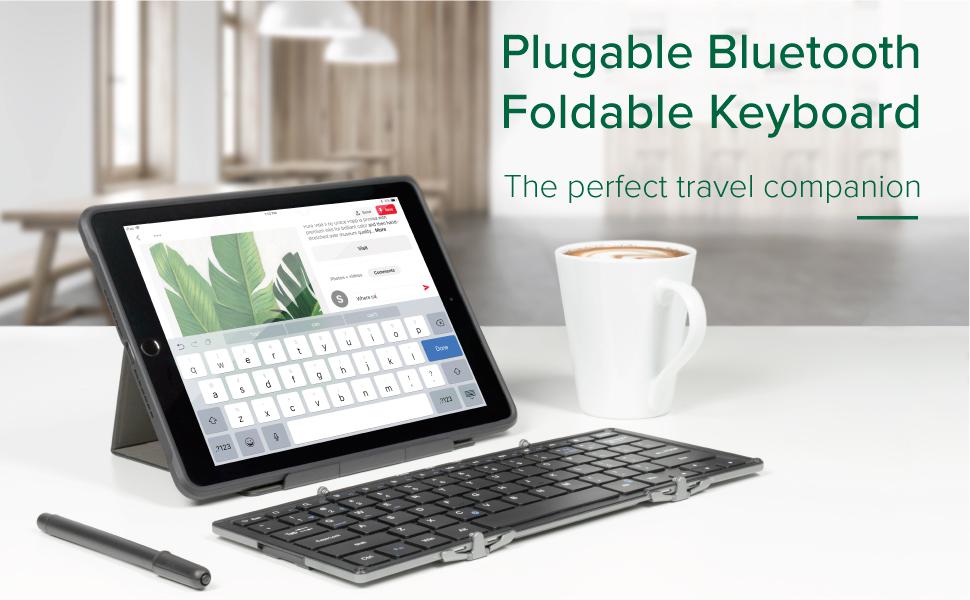
The Plugable Folding Bluetooth Keyboard BT-KEY3 is small, convenient, and easy to use with any phone or tablet. Whether you’re texting, sending emails, or writing a report this keyboard is great for planes, coffee shops, and more! Yet, when you are ready to go, it folds smaller than a paperback book and fits right in a bag or briefcase with your tablet or phone.
Portable
Experience the ease of typing on a keyboard while away from your desk. The keys are slightly smaller than on a regular keyboard and have a crisp and familiar touch, with the precise scissor switch mechanism found on quality desktop and laptop keyboards.

Charging
Minutes of charging give you hours of use! Plug the keyboard into a USB charger or computer.
Use the Case as a Stand
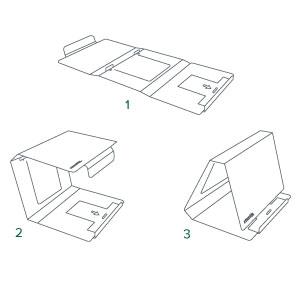
The included case protects your keyboard when stowed, then a quick flip of the cover turns it into an adjustable stand for your phone or tablet. The fitted case is lined with soft microfiber on the inside to protect the keyboard with a soft leather-like surface on the outside.
Compatibility
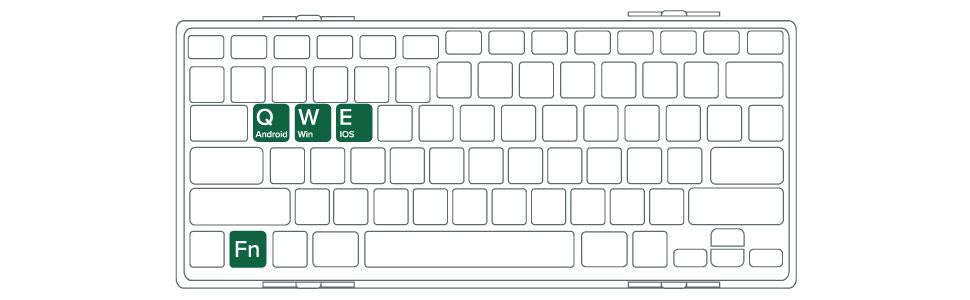
The Plugable keyboard connects via both Bluetooth. It features USB charging and compatibility modes for iOS, Android, and Windows. A row of dedicated special keys and quick two-finger key combos give you lots of control over your devices, such as:
- Esc, F1-12 (Fn + Top Row Keys): Windows
- Media keys (Pause/Play, Forward, Back, Volume Up/Down): iOS, Android, Mac (iTunes)
- Edit keys (Copy, Cut, Paste, Select All): iOS
- and more!
In The Box
| Item and Quantity | Item Notes |
|---|---|
| 1x Plugable Bluetooth Foldable Keyboard | |
| 1x Case/Stand | |
| 1x USB 2.0 Type-A to Micro-B Cable |
Included Cables
| Port Type (Side 1) | Cable Specification | Port Type (Side 2) | Cable Length | External Power for Cable |
|---|---|---|---|---|
| Male USB Micro-B | USB-A | 1.53m/5.02ft | No |
LEDs
| LED Number | Shape | Color | Status | Definition | Notes |
|---|---|---|---|---|---|
| 1 | Dot | Blue | Blinking | Bluetooth is broadcasting | Left LED |
| 1 | Dot | Red | Blinking | Battery low | Left LED |
| 2 | Dot | Green | Solid | Paired and ready to use | Right LED |
| 2 | Dot | Red | Solid | Charging | Right LED |
Keyboard
| Layout and Profile | Key Count | Switch Type | Legend and Keycap Material | Keyboard Lighting (Color) | Lighting Modes |
|---|---|---|---|---|---|
| Laptop ANSI Flat Profile |
64-Key | Scissor | Silk Screen Print | None | None |
Power
| Port | Placement | Power Host / Device | Connection Type | AC Inlet | Notes | Voltage | Amperage | Wattage |
|---|---|---|---|---|---|---|---|---|
| USB-A to Any USB Charging Port | Cable End | Device | 5.0V | 200mA | 1.0W |
Connection To Host
| Port | Placement | Version and Link Rate | Features |
|---|---|---|---|
| 1x Bluetooth Classic | Internal | Bluetooth (2.1Mbps) |
Bluetooth
| Bluetooth Specification | Supported Profiles | Notable Unsupported Profiles | Bluetooth Class and Range | Chipset |
|---|---|---|---|---|
| Bluetooth 3.0 | See Profile Compatibility Table | Class 2 10m/32ft |
Physical Stats
| Item | Size (H x W x D) or Length | Weight | SKU or Part Number |
|---|---|---|---|
| Bluetooth Keyboard | 1.2 x 25.2 x 8.9 centimeters 0.5 x 9.9 x 3.5 inches |
317 grams 11.2 ounces |
BT-KEY3 |
Platforms
Any device that can use a Bluetooth keyboard should work with this keyboard. That includes Windows, Linux, macOS, iOS, and Android operating systems.
Bluetooth Profiles
This keyboard uses standard Bluetooth HID (Human Interface Device) profiles as part of the Bluetooth 3.0 specifications.
Popular Compatible Systems
| Apple | Apple Vision Pro / iPad / iPad Pro, iPhone |
| Samsung Phones, Tablets and VR | Samsung Galaxy S23 / S23+ / S23 Ultra, S22 / S22+ / S22, S21 / S21+ / S21 Ultra, S10 / S10+ / S10e / S9 / S9+ / S8 / S8+, Note 20 / 20 Ultra / 10 / 9 / 8) |
| Google Phones and Tablets | Google Pixel 8 / Pro Pixel 7 Pro / 7 / 6 Pro / 6 / 5 / 4 XL / 4 / 3 XL / 3 / 2 XL / 2 / 1 XL / 1 |
| Mac | MacBook Pro, MacBookAir, MacBook Retina, MacBook M1 / M2 / M3 |
| Windows | HP Spectre x360 / Envy, Dell XPS / Precision / Latitude, Lenovo ThinkPad / IdeaPad, Surface Pro 7 / 7+ / 8 / 9 / X, Surface Laptop 3 / 4 / 5 / Go / Go 2 / Studio / SE, Surface Go / Go 2 / Go 3, and others |
| Chromebooks | Google Chromebooks, Google Pixelbook Go / Samsung Galaxy Chromebook 2 / Lenovo Chromebook Duet 3, and others |
Get Started
- Enable Bluetooth on your host device, and make it visible.
- Unfold the keyboard to power it on.
- Press Function (Fn) + c to put the keyboard in pairing mode. The blue light will flash.
- Pair the keyboard from your host device's user interface.
Questions? We're here to help! Please reach out to us at support@plugable.com
Filter Help Articles and Frequent Questions by Category
Choose one or more filters within each category to narrow down the articles. Each selection will result in only displaying articles that include all of your choices.
Articles
Well how about that, it looks like we don't have any articles matching your filters! Try removing one of your choices or clear the filters to show all articles.
You can always contact support if you need help too!
Why can't I drive two external extended displays with my Google Pixel phone?
Google Pixel phones support USB-C DisplayPort Alternate Mode for wired video output, but due to Android OS limitations, they cannot produce two extended external displays using MST, DisplayLink, or Thunderbolt docking technologies. This is a platform constraint, not a hardware or dock issue.
Understanding the Limitation
Google Pixel phones are limited by the Android operating system’s handling of external displays. While many Pixel models (such as the Pixel 7 and Pixel 8 series) support USB-C DisplayPort Alternate Mode, they can only output to a single external display at a time. Android is designed primarily for screen mirroring, and extended display support is extremely limited across Android phones.
Key Point:
Android OS currently restricts Pixel phones to one external display, regardless of the dock or adapter used.
Dock Behavior with Pixel Phones
MST Docks (e.g., Plugable UD-MSTH2)
MST (Multi-Stream Transport) requires the host device to support splitting one DisplayPort signal into multiple independent video streams. While common on Windows and many Chromebooks, Pixel phones do not support MST for extended displays.
When using an MST dock, a Pixel phone will:
- Output to one external display only, or
- Mirror the same content to two connected monitors
- Dual extended desktops are not supported
DisplayLink Docks
DisplayLink technology works on Android through a companion app (e.g., DisplayLink Presenter). However:
- Android only supports a single external display via DisplayLink
- DisplayLink docks cannot be used to achieve multiple extended monitors from a Pixel device
- DisplayLink is not recommended for dual display use on Android
Thunderbolt Docks
Google Pixel phones are not Thunderbolt-certified hosts. When connected to a Thunderbolt dock:
- They revert to basic USB-C DisplayPort Alternate Mode
- Only a single mirrored display is possible
Visual Summary
| Dock Type | Extended Displays | Mirroring | Notes |
|---|---|---|---|
| MST Dock | ❌ | ✅ | No MST support on Android |
| DisplayLink Dock | ❌ | ✅ | Requires DisplayLink app |
| Thunderbolt Dock | ❌ | ✅ | Functions as USB-C only |
Recommended Alternatives
If your goal is to use two independent external displays, consider the following instead:
- Windows laptops with DisplayPort MST support
- Chromebooks that support MST
Frequently Asked Questions
Q: Can I extend my Pixel’s screen to two monitors using any method?
A: No. As of now, Android does not support multiple extended displays. Only mirroring to one display is possible.
Q: Does DisplayLink allow multiple displays on Android?
A: No. Even with DisplayLink’s Android app, you are limited to one external display.
Q: Why do Windows and ChromeOS devices work with MST but not Android?
A: Android lacks support for DisplayPort MST and advanced GPU capabilities required for multiple display outputs. This is a software/platform-level limitation.
Conclusion
While Google Pixel phones are capable of driving a single external display, dual extended monitors are not possible due to Android OS restrictions. This applies across all dock types, including MST, DisplayLink, and Thunderbolt. For users requiring robust multi-display setups, we recommend using a Windows or Chromebook device that supports MST alongside a compatible docking station like the Plugable UD-MSTH2.
If you have any questions or need help selecting a compatible dock, reach out to our support team at support@plugable.com.
Can My Bluetooth Folding Keyboard Be Used While Charging?
BT-KEY3—Yes, the Bluetooth keyboard will work while it is charging and connected via Bluetooth to the host.
BT-KEYXL—Yes, the Bluetooth keyboard will work while it is charging and connected either via Bluetooth or USB to the host.
What Do the Lights on the Bluetooth Folding Keyboard Mean?
This article explains what the LED keys on Plugable Folding keyboards indicate when they light up.
BT-KEY3XL:
| Light | Status |
| Power LED in Red | The keyboard is charging through the USB port. It will go out when charging is finished. |
| Power LED in Green | The keyboard has sufficient charge for operation. (Turns on when opening the keyboard, then turns off.) |
| Power LED in Green - flashing | You can check the keyboard's charge level by pressing Fn + Right Alt. This LED indicates the battery level from 4 flashes (full battery) to 1 flash (needs charging). |
| State LED in Blue - flashing | The keyboard is broadcasting its existence through Bluetooth and can be discovered by your computer, tablet, or phone. (Press Fn + C to enter Bluetooth parting mode) |
| State LED in Green | The keyboard is operating in USB mode *) |
| Caps LED in Blue | Caps Lock is on. |
*) Switching USB / Bluetooth mode:
- Fn + 1 : Bluetooth mode
- Fn + 2 : USB mode
BT-KEY3:
| Light | Status |
| Left LED in Blue - flashing | The keyboard is broadcasting its existence through Bluetooth and can be discovered by your computer, tablet, or phone. (Press Fn + C to enter Bluetooth parting mode.) |
| Left LED in Red - flashing | The battery needs charging. |
| Right LED in Green | The keyboard is ready to use. (Turns on when opening the keyboard, then turns off.) |
| Right LED in Red | The keyboard is charging through the USB port. It will go out when charging is finished. |